
An approver leaves the company on Friday. Their Atlassian account is deactivated. On Monday, Jira still shows their name on a request waiting for their decision.
The offboarding worked. The approval did not move. Deactivating the person and repairing their open approvals are two separate jobs.
That gap is easy to miss because Jira preserves the original assignment. It does not know who should inherit the decision, and it must not quietly transfer one person's authority to another.
Offboarding does not reassign an approval
Atlassian tracks this behaviour in JSDCLOUD-13020. Deactivate someone who is already named on a JSM approval, and they remain on its approver list.
The result is safer than an invisible reassignment, but it leaves a live request waiting on somebody who cannot sign in or respond.
The useful check is not “Is this approval old?” Ask whether every person Jira is waiting for can still answer today.
Find stranded approvals before a requester reports them
Start with open requests that still carry a pending approval:
approvals = pending() AND statusCategory != DoneThe status condition keeps closed migration leftovers out of the chasing queue. For each live result, compare the pending approvers with your active Atlassian accounts.
On a small site, an admin can do this from the request and user administration screens. Across several service projects, that becomes another offboarding report to maintain.
Check the approval rule before adding anybody
Open the workflow and check how many decisions the approval step requires. The repair changes with the rule:
- One or a fixed number must approve: an additional active approver may supply the missing decision.
- Everyone must approve: adding somebody does not replace the inactive person's decision. The request needs administrative repair.
- The source is an approver group: membership changes can affect access and approvals across the site, not only this request.
Keep the original approver visible unless your audit policy requires something different. Add the replacement as an additional approver, then check the approval panel before asking them to respond.
Approval Nudge stops chasing accounts that cannot answer
Approval Nudge 3.7 added deactivated-approver detection. During each scan, the app checks the pending people it finds. The Approvals Overview marks an inactive account instead of treating that person like somebody who missed an email.
The app does not try to resend Jira's approval email to a deactivated account. Agents can see why the request is stuck without opening notification logs or waiting for another failed reminder.
Advanced can add a project-wide fallback
The Advanced edition can add one active person when an Approvers-field approval is stranded. A project admin chooses the project-wide fallback stand-in. If a pending approver is deactivated, the next scan can add that stand-in immediately.
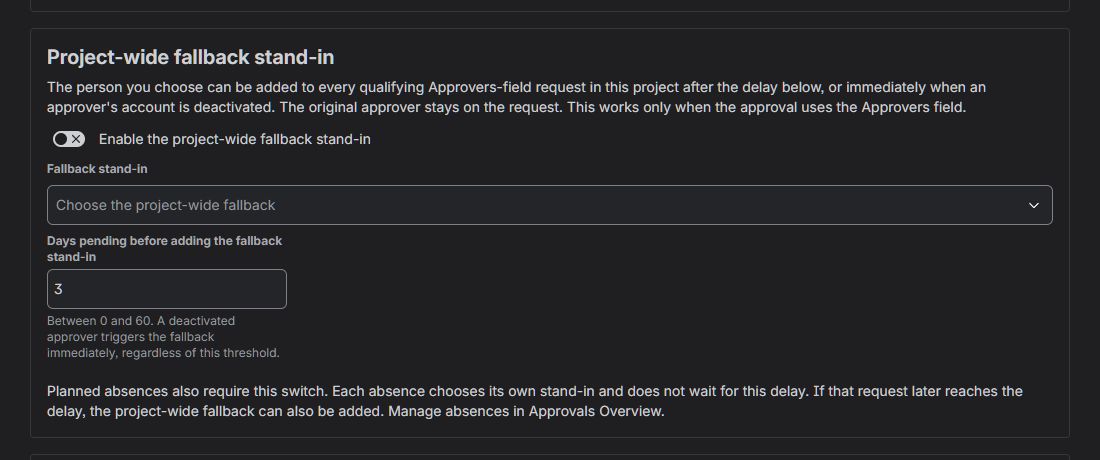
One explicit fallback for the project. The normal delay still applies to approvals that are simply old.
The original approver remains on the request. The stand-in is additional, and an internal comment records why they were added. Approval Nudge never transfers the original person's identity, authority or decision.
The fallback has these limits:
- The fallback works only with approval steps that use Jira's Approvers field.
- It does not edit approver groups or act on team-managed approvals.
- It cannot make an “everyone must approve” step forget a missing decision.
- It stops if anybody has already approved or declined.
Put open approvals on the offboarding checklist
When somebody leaves, check four places: work assigned to them, automation they own, approvals still waiting for them, and groups that grant approval authority.
Jira cannot choose the replacement. Your organisation still decides who may answer. Approval Nudge handles the repetitive part: find the stranded request, follow the approved fallback rule and leave a record that the next admin can understand.
View Approval Nudge on the Atlassian Marketplace, use the Approval Nudge admin guide for setup details, or read the full Jira repair guide on Atlassian Community.