
A request is waiting on an approver group. Jira shows the group and the number of decisions required. Then the request stalls, and the useful question changes: which people inside that group still need to answer?
That question is where the admin work begins. Open the request. Check the approval. Work out who has already replied. Find the people still pending. Chase them. Repeat it tomorrow across every service project.
Approval Nudge 3.15 and 3.16 remove that routine. Both editions now discover group-backed approvals. Advanced emails the people still waiting and records what it did.
A group is not an inbox
Jira uses the group to decide who may approve. Each group member still answers as an individual. One person may already have approved, another may be away, and another may have missed Jira's original email.
A broad comment to “the group” does not solve that. A useful reminder needs the current person-by-person decision list.
The admin needs names, not group arithmetic. Approval Nudge reads each current decision and shows the people who are still waiting.
3.15: make group approvals visible
A project admin opens the project's Approval Nudge settings and saves the enabled configuration once. From then on, scheduled scans can read the group approval details that admin is already permitted to view.
This works in both Standard and Advanced. Group approvals appear beside Approvers-field approvals in the same cross-project Overview. The app does not need a copied list of group members, and the admin does not need another dashboard.
The saved access is read-only. Approval Nudge cannot decide for an approver, edit the group, or grant somebody approval rights.
3.16: email the people still waiting
Advanced adds one group-specific control: Email people who haven't approved. It uses the project's existing reminder schedule, so admins do not have to maintain another timer.

One explicit setting. Existing projects remain off until an admin enables it.
There is an important difference between the two approval sources:
- Approvers field: Approval Nudge can resend Jira's original email with its Approve and Decline buttons.
- Approver groups: Approval Nudge sends a new Jira-hosted reminder with a link to the request.
To the person receiving it, both messages say the same useful thing: this approval still needs you. Behind the scenes, the group version avoids a risky trick. It never adds or removes group members to force another Jira email.
Follow the approval, not a mailing list
Before Jira sends a group reminder, Approval Nudge reads the approval again. It targets active accounts whose current decision is still pending. It refuses to send if Jira cannot confirm the full recipient list.
The app also stops group emails as soon as anybody approves or declines. A request that has moved forward cannot keep producing follow-ups from an old scan.
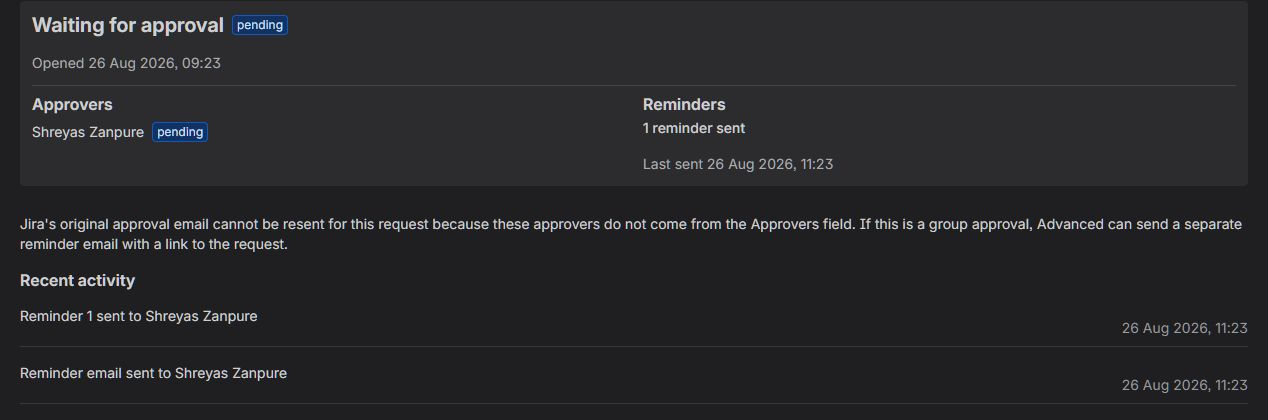
The request panel records the reminder and the Jira-hosted email. Agents can answer “was this person contacted?” without opening notification logs.
One queue for the admin
The Approvals Overview brings the work together. It shows the request, project, waiting time, pending person, reminder count and whether nudging is enabled.
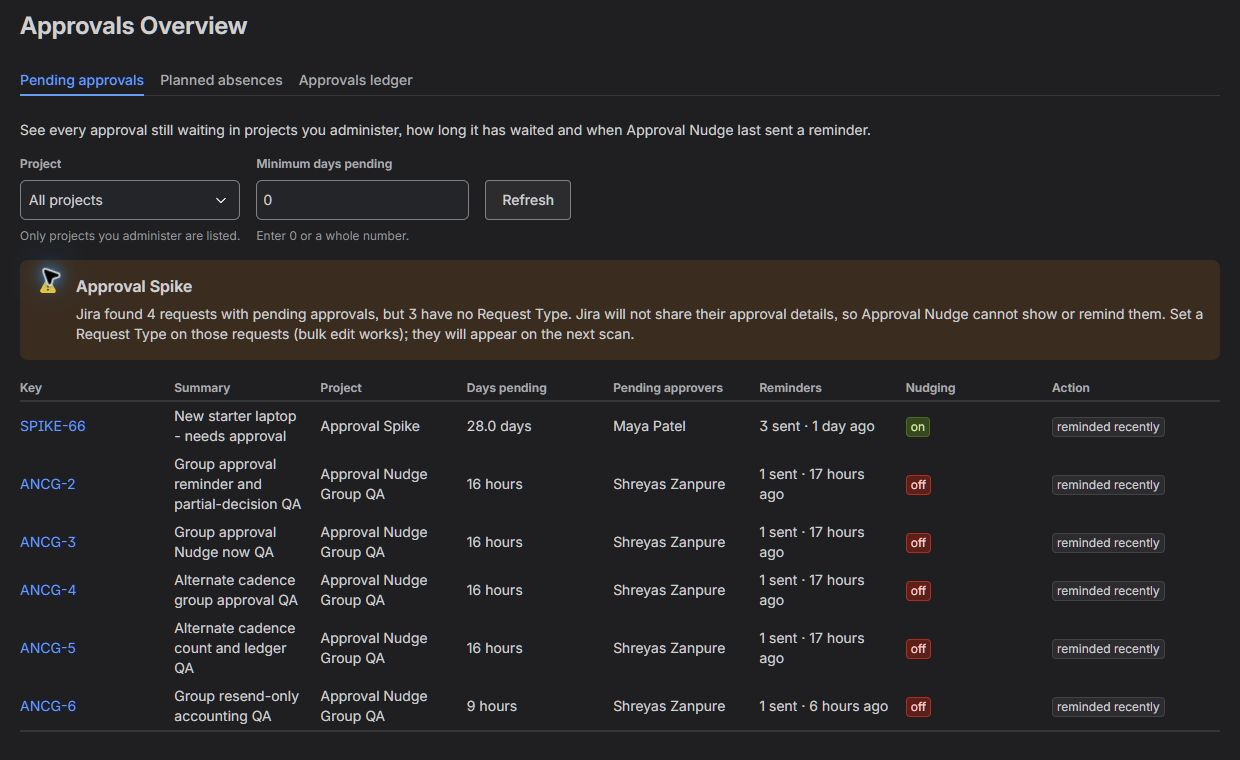
Group-backed and individual approvals share one view. The warning also explains requests that Jira will not expose to apps.
For an admin, that replaces a list of small interruptions:
- Stop opening every waiting request to find the pending person.
- Stop maintaining separate reminder rules for group-backed steps.
- Stop reminding people who have already answered.
- Stop guessing whether the follow-up email actually ran.
Know whether planned cover will work
Advanced already lets an admin plan cover for an absent approver. When the approval uses Jira's Approvers field, the stand-in joins as an additional approver.
A group-backed approval has a different boundary. Adding somebody to a Jira group can affect access and approvals across the site, not only this request. Approval Nudge therefore checks whether the planned stand-in is already eligible through the group and reports the answer in the Overview.
The app checks whether the stand-in can approve. The Jira admin remains responsible for group membership.
Available now
Approval Nudge 3.15 added group discovery and alternate reminder schedules. Version 3.16 added targeted group reminder emails, group cover-readiness checks and clearer settings panels.
The result is a smaller admin job: one save so scans can read the group decisions, one clear switch for follow-up emails, and one Overview for the queue.
View Approval Nudge on the Atlassian Marketplace, or use the Approval Nudge admin guide for the exact setup and safety limits.